Think out loud.
Type into any app instantly.
Whisp is the private macOS voice layer for developers. Press ⌥ Option–Space and talk through a command, bug fix, architecture thought, or message. Whisp transcribes on-device and streams clean text directly into Terminal, Claude Code, Cursor, Apple Notes, or any focused app.
Works natively across your entire developer toolchain
Code isn't prose. Whisp outputs exact syntax.
Generic dictation apps insert spaces into flags, mangle file paths, and destroy casing. Whisp is engineered for the developer dialect.
Competitors charge $8–$20/mo ($96+/yr). Whisp is $9.99 once for lifetime.
Designed for performance.
Obsessed with developer privacy.
Whisp isn't a raw speech-to-text dump. It is a lean native macOS app engineered to deliver clean, ready-to-use code and text directly into your tools while keeping audio processing 100% local.
Focus-Lock Direct Text Injection
Whisp inspects the frontmost macOS window at the exact moment capture begins. When transcription finishes, it verifies that the initial target window is still active before inserting text. If you switch to Slack, email, or a browser mid-sentence, text stays safely on your clipboard instead of typing into the wrong place.
Zero Model Downloads
Other tools force you to download 1.5 GB to 3.5 GB Whisper models that spin your fans and drain battery. Whisp runs on macOS Apple Speech, accelerated natively by Apple Silicon Neural Engine with instant startup and zero disk overhead.
Three Floating Styles
Choose between the full Default 430pt bar with audio signal, the discrete Mini capsule with floating captions, or None for stealth headless dictation.
Continuous Capture & Audio Ducking
Keeps recording through pauses until you finish explicitly. Optionally pauses or mutes Mac speaker output so Spotify or YouTube never bleeds into your microphone.
Searchable History (250 Items)
Press Option–H from any app to summon an instant clipboard modal with your latest 10 captures, real-time search across 250 records, 1-click copy, and individual deletion.
Inside Whisp
A little less typing. A little more flow.
Take a closer look at the Mac app, from the first spoken thought to the words ready to paste.
Think it. Say it. Paste it.
Turn spoken thoughts into text, then copy them for the app you are working in.
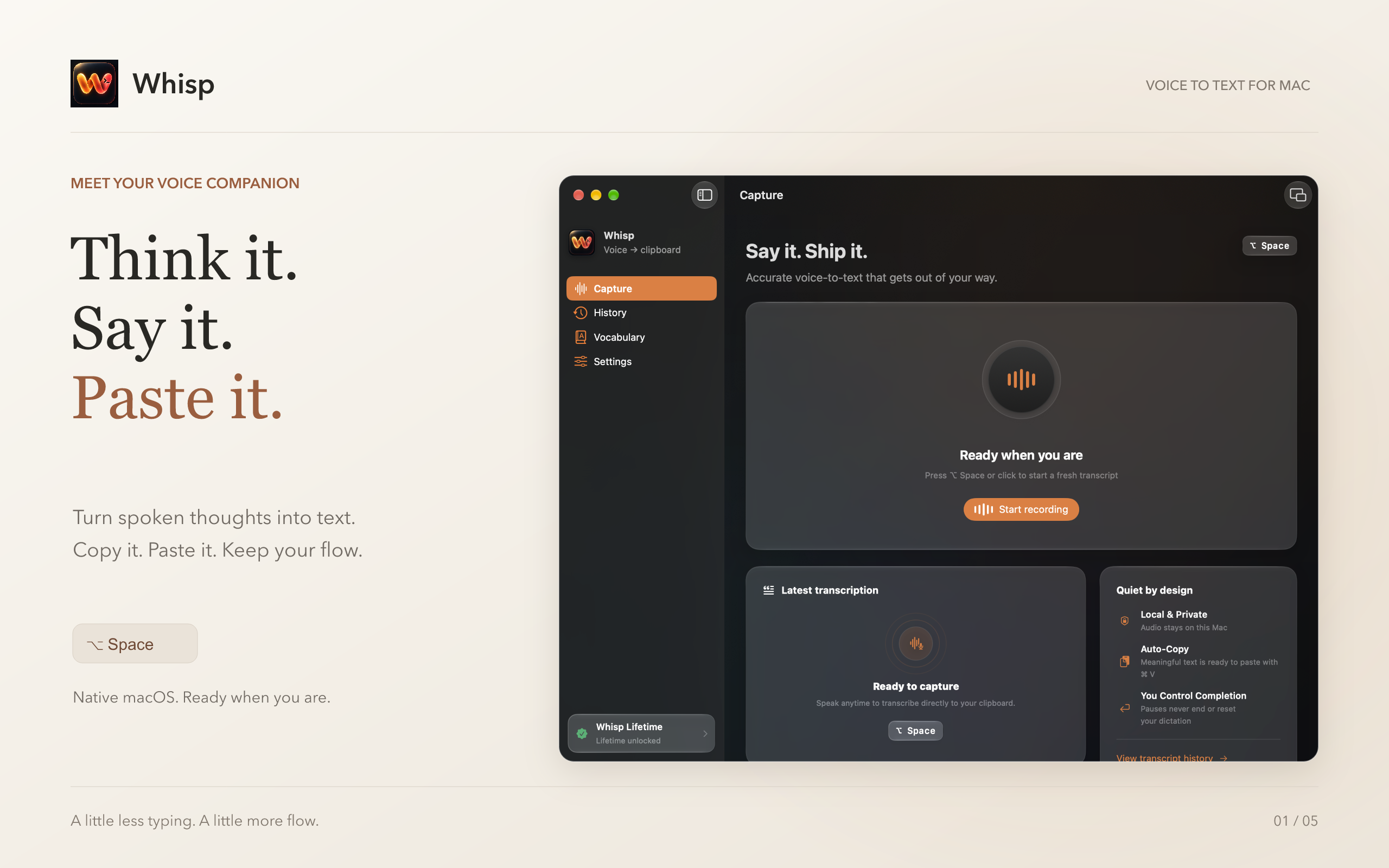
Built for muscle memory. Fully remappable.
Zero mouse required. Control capture, commits, translations, and history lookup directly from your home row. Keep the battle-tested macOS defaults or remap every key in Settings.
Start & Toggle Voice Capture
Instantly activates the microphone and registers the frontmost app target. Press again to commit.
Hold to Talk, Release to Copy
Hold Option + R while speaking; release to transcribe and copy for Command–V.
Commit, Translate, or Discard
Return finalizes. Option–Return translates native speech to English locally and pastes. Escape cancels and discards audio cleanly.
History, Audio Source & Widget Toggle
Option–H opens the 10-item recent clipboard card. Option–M opens the microphone picker. Option–B toggles widget visibility while idle.
On-Device Passive Listening
Whisp maintains a rolling 4-second local audio buffer so you can speak in one continuous breath. The wake phrase is automatically stripped.
Remap Keys, Timing & Layout
Record physical key combinations in Settings, and toggle between Default Bar, Mini Capsule, and Stealth mode. Pauses never end an active dictation.
Own your tools.
No recurring subscriptions.
Test Whisp completely free for 7 days with full features. It’s free by default upon install—no credit card, no personal info, and no promo code required. Unlock lifetime access after a week only if you choose.
Whisp Lifetime
Mac App Store In-App Purchase
Includes 7-Day Free Trial with unrestricted local features. Zero recurring subscription charges.
100% Free Trial — No Credit Card, No Code Needed
Whisp is free by default when you install it. You do not even need to put in a card or enter any personal information to try it. After a week, you can choose to purchase lifetime access.
- ✓7 Days Completely Free: Active by default upon install. No card, no info, no code needed.
- ✓Lifetime License: One-time payment, no monthly or annual billing
- ✓Zero Model Downloads: 0 GB footprint vs 1.5–3.5 GB Whisper models
- ✓Direct Focus-Lock Injection: Claude Code, Cursor, Gemini CLI, Codex
- ✓On-Device Apple Speech: Hardware accelerated, audio stays on your Mac
- ✓Persistent History & Shortcuts: 250 captures, Option–H modal, wake word
- ✓Family & Multi-Mac: Restore Purchases across all Macs on your Apple ID
No credit card required to try • Automatic local trial • Never auto-charges
Why developers choose Whisp
Side-by-side| Feature | Whisp | Competitors |
|---|---|---|
| Free Trial Setup | No Card Needed | Credit card upfront |
| Model Download | 0 GB (Instant) | 1.5–3.5 GB |
| Pricing Model | $9.99 once | $8–$20 / mo |
| Battery & Fans | Zero overhead | Heavy GPU load |
| Terminal Safety | Focus-Lock | Unverified input |
| Offline Privacy | 100% On-Device | Varies / Cloud |
| Developer Syntax | Native Flags | General prose |
Other tools charge more in a single month than Whisp costs for a lifetime license. Whisp leverages Apple's built-in Neural Engine to deliver instant speech recognition without filling your Mac with gigabytes of local AI models.
Frequently asked questions.
Everything you need to know about Whisp, privacy, and developer workflows.
The Mac App Store build copies the transcript so you can paste it with Command–V. Direct builds can optionally insert it into the app that was focused when recording began. Automatic Paste requires Accessibility, checks that the target app is still active, and never presses Return.
Think out loud. Ship in your terminal.
Talk through commands, architecture, and agent prompts. Whisp turns them into clean text and delivers them to the focused app—without breaking your flow.
Free by default upon install • Apple Silicon & Intel macOS 26.5+